- The full width compact hero has a background image extending to the edge of the 12-column grid on Large viewports. The background image extends to the viewport's edges on Small and Medium devices.
Disclaimer:
- A Desktop and a Mobile version must be choosen in orden to create art assets with specific design specifications.

The full width compact hero's basic anatomy comprises 4 primary areas — background, image, body and CTA.
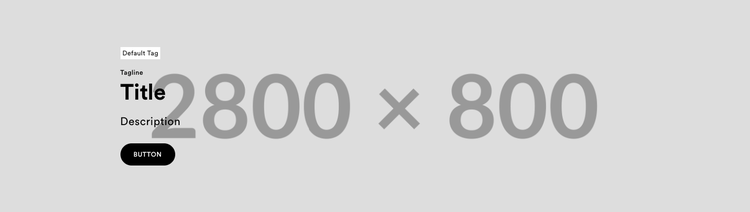
Default Tag - Use for messaging like "Proximamente" or "Ag 20 - Ag 30" - MAX 25 Characters
Tagline - Use for messaging like "Online Only" and "Only at Ulta Beauty" etc - MAX 15 Characters
Title - Title, required - Use clear and succinct language - MAX 45 Characters
Description - Use to provide context to the Title - MAX 45 Characters
Button - Used to redirect the user to another part of the site
Redirect - Where the CTA should redirect to. Ex: Brandstore - PDP specific UPC
By default the texts color placed in AEM to the Full Width Compact banner is Black(#000000).
⚠️❗IMPORTANT❗⚠️
It is essential to use light background colors for background images design
This ensures sufficient contrast between text and background to meet ADA (Americans with Disabilities Act) accessibility requirements. Using light backgrounds helps maintain readability, prevents eye strain, and guarantees compliance with accessibility guidelines.
⚠️ Text copies must be delivered to the business owner independently of the design, using the available anatomy properties as a reference.⚠️
✅ Correct Design ✅
Desktop

Mobile



Width: 2800px
Height: 800px
Resolution:300 dpis
The full width compact hero's basic anatomy comprises 4 primary areas — background, image, body and CTA.
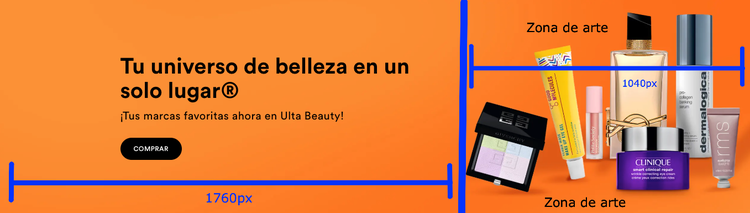
General Layout on Desktop
1760px/1040px Visual Split:
-
1760px of the width on the left contains editorial content (text + button).
-
1040px on the right contains multimedia content (images of models, products).
Width: 1400px
Height: 1400px
Resolution:300 dpis
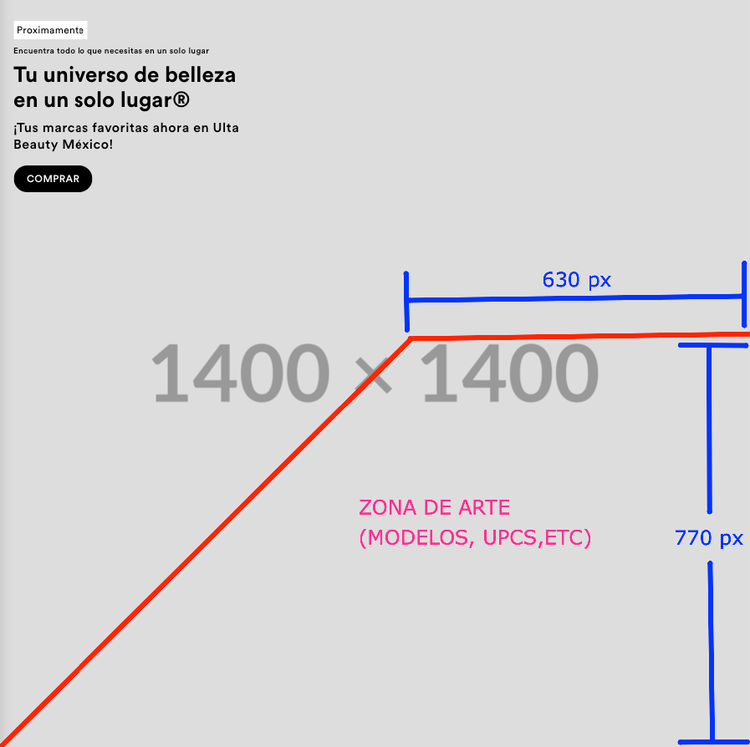
Technical Recommendations for Mobile Version
- The marked area should begin approximately between 45% and 50% of the horizontal axis (X-axis) from the left edge of the image. As for its height, it should not exceed 60% of the total height of the canvas, as its purpose is to accommodate visual content (such as faces or products) without interfering with text.
Width: 1400px
Height: 1400px
Resolution:300 dpis
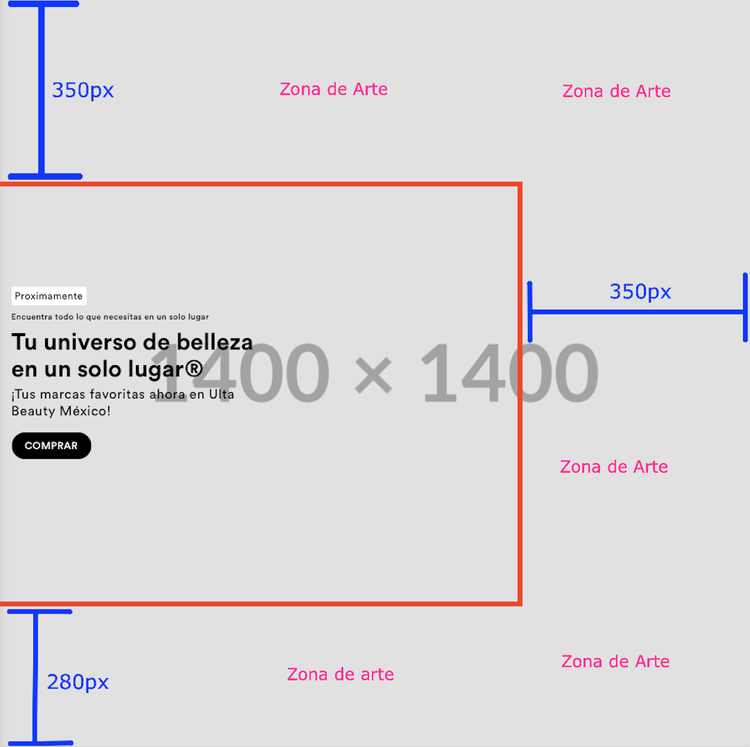
🟥 Safe Zone (Content Area)
The red box represents the safe zone, where all key communication content must be placed:
-
Text elements (headlines, subheadings, disclaimers)
-
Buttons and calls to action (CTAs)
-
Any elements that must not be cropped or overlapped
This zone ensures full visibility across mobile and responsive platforms.
🟧 Artwork Area
The areas outside the red box are designated as the “Artwork Area”, intended for non-essential visual enhancements such as:
-
Product photography
-
Models or lifestyle images
-
Background textures, lighting effects, or graphic elements
Width: 1400px
Height: 1400px
Resolution:300 dpis
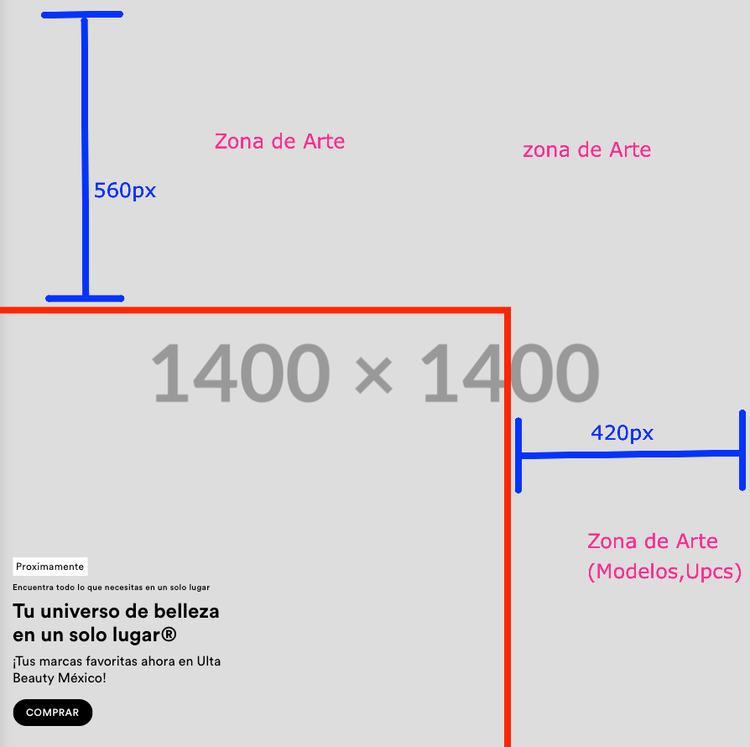
🟥 Safe Zone (Content Area)
The red rectangle defines the safe zone for core content. All essential communication must remain within this zone to ensure visibility across different platforms:
-
Text: headlines, subheadings, disclaimers
-
Call-to-action buttons (CTAs)
-
Logos and legal info
This zone should be considered the fixed area where content is never cropped.
🟧 Artwork Area (Outside Safe Zone)
The outer gray space, labeled "ZONA DE ARTE", is intended for purely visual enhancements and not for text or actionable content
Artwork Area Proportions (Relative to Full Canvas – 1400 × 1400 px)
-
Top – 40% of height
Ideal for decorative elements: gradients, product halo, upper imagery, etc. -
Right – 30% of width
Space for cropped models, packaging visuals, or environmental background
Width: 1400px
Height: 1400px
Resolution:300 dpis
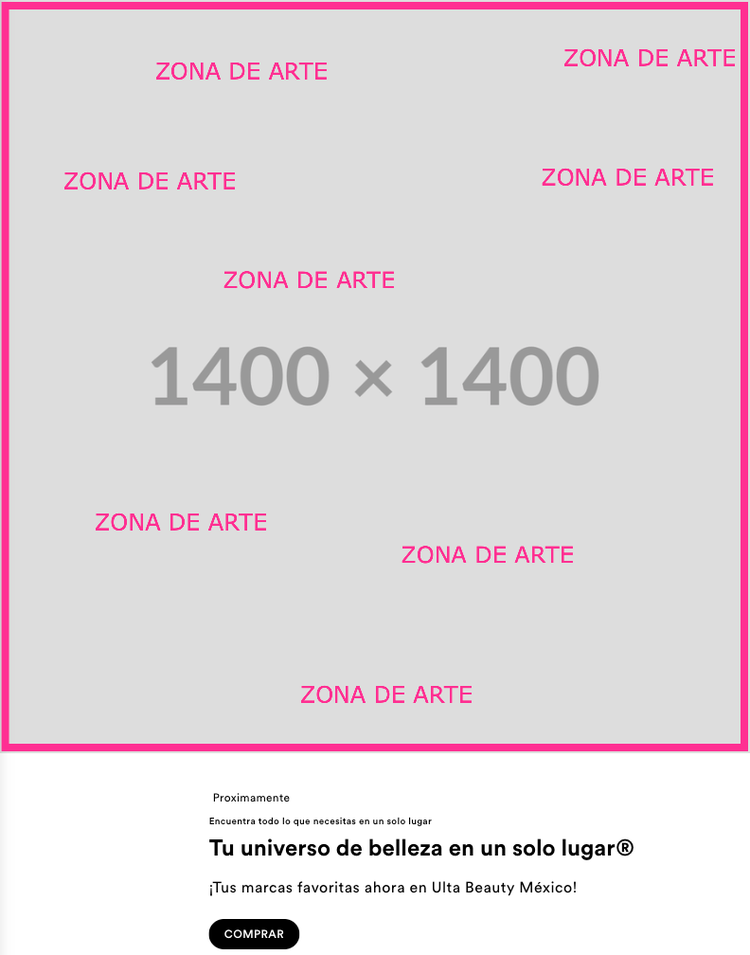
🟧 Artwork Area (Outside Safe Zone)
Yo can use the hole canva to design.